
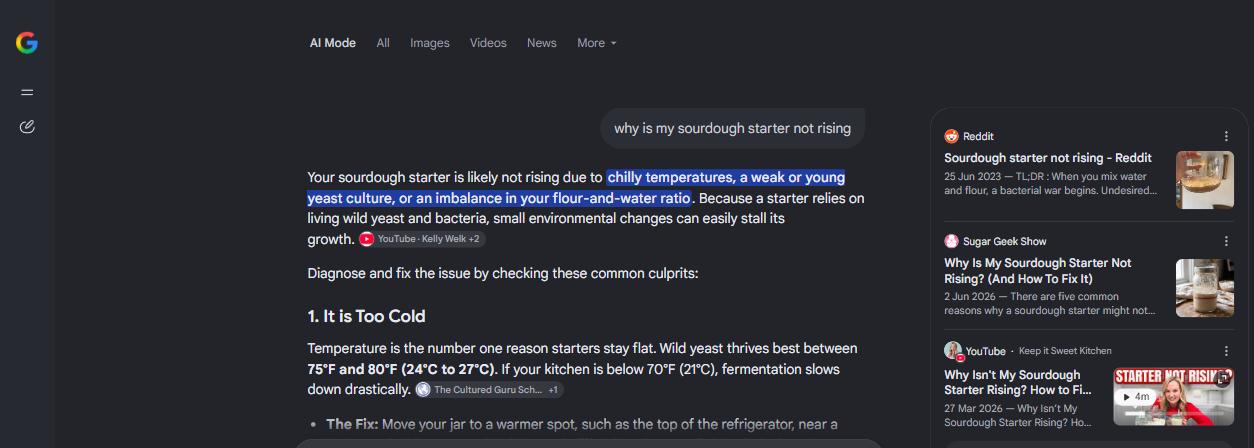
What AI Mode is
AI Mode is a separate way of searching inside Google. Google's help page describes it like this:
"AI Mode is Google’s most powerful AI search experience. You can ask anything and get an AI-powered response, with the ability to go deeper through follow-up questions and helpful links to the web."
An AI Overview appears by itself above the ordinary results. AI Mode is something the user opens. Google lists three ways in: google.com/ai, the AI Mode option after typing a question on google.com, and AI Mode on the home screen of the Google app. A question can be typed or spoken, asked with images, PDFs or other files, or asked about a pasted URL.
It is not limited to the United States or to English. The help page, retrieved on 15 September 2026, lists supported countries including Germany, France, Italy, Spain and the United Kingdom, together with a long list of supported languages.
How it differs from AI Overviews
Google's Search Central documentation separates the two by purpose. AI Overviews "help people get to the gist of a complicated topic or question more quickly". AI Mode "is particularly helpful for queries where further exploration, reasoning, or complex comparisons are needed."
They also appear differently. AI Overviews "are only shown when our systems determine that it is additive to classic Search, and as such, often don't trigger." AI Mode is where the user has chosen to ask, and the conversation can continue with follow-up questions.
For measurement, the most important sentence is this one:
"AI Mode and AI Overviews may use different models and techniques, so the set of responses and links they show will vary."
A page linked in one is not necessarily linked in the other, and a result for one says nothing certain about the other.
Two generated answers from Google, reached in different ways.
AI Overview
appears by itself
Above the ordinary results, on queries where Google judges it useful.
“only shown when our systems determine that it is additive to classic Search, and as such, often don’t trigger”
AI Mode
opened by the user
The user asks, and the conversation can continue with follow-up questions.
“In some cases, AI Mode will provide a set of web links if there’s not high enough confidence in the quality or helpfulness of an AI response.”
How an answer is put together
Both features use query fan-out. The help page describes it for AI Mode:
"AI mode uses a “query fan-out” technique, dividing your question into subtopics and searching for each one simultaneously across multiple data sources. It then brings those results together to provide an easy-to-understand response."
Three further details from the same page change how a single answer should be read.
It can hold back. "In some cases, AI Mode will provide a set of web links if there’s not high enough confidence in the quality or helpfulness of an AI response."
It can be personal. Personalisation is available to users aged 18 or over who have history and personalised recommendations turned on. In that case Google says AI Mode "references previous searches and activity saved in your Search Services History". Two people asking the same question can get different answers.
The model can differ. Where it is offered, users can pick a Pro model, Gemini 3 Pro, instead of the Fast model, and Google notes that the Pro model has daily usage limits.
Google is plain about accuracy, too: "As with any early-stage AI product, AI Mode doesn’t always get it right."
The steps behind a single response, and two ways it can change.
The question
asked once by the user
Subtopics
“dividing your question into subtopics”
Searches at once
“searching for each one simultaneously across multiple data sources”
One response
“brings those results together”, with links to the web
Not confident enough
Instead of a generated answer: “a set of web links”
Personalised
For users aged 18 or over with history and personalised recommendations on, it “references previous searches and activity saved in your Search Services History”
How AI Mode started
Google introduced AI Mode on 5 March 2025 as "an early experiment in Labs", running on a custom version of Gemini 2.0. On 20 May 2025, at Google I/O, it began rolling out in the U.S. with "no Labs sign-up required". Models, features and the list of countries have changed since, so any statement about AI Mode needs a date next to it.
How to appear in it
There is no separate route. Google's documentation covers AI Overviews and AI Mode together:
"To be eligible to be shown as a supporting link in AI Overviews or AI Mode, a page must be indexed and eligible to be shown in Google Search with a snippet, fulfilling the Search technical requirements. There are no additional technical requirements."
The same page rules out the shortcuts: "You don't need to create new machine readable files, AI text files, or markup to appear in these features." That covers files such as llms.txt.
How Search Console counts it
Clicks and impressions from AI Mode are part of the Performance report under the Web search type. Google's help page on impressions, position and clicks sets out three rules for AI Mode:
- Click: "Clicking a link to an external page in AI Mode counts as a click."
- Position: "Position in AI Mode follows the same methodology as a Google Search results page."
- Follow-up: "If a user asks a follow-up question within AI Mode, they are essentially performing a new query."
The last rule matters when reading the numbers. A conversation of four questions is four queries in the report, and the data from each answer belongs to the question that produced it.
The separate generative AI performance report shows impressions in AI Overviews and AI Mode, grouped by page, country, date or device. Its help page notes that the report reached all websites at the end of August 2026 ("As of August 31, 2026, we’ve rolled out these insights to all websites worldwide") and that "Search Console doesn't include data from experiments in Search Labs".
One conversation in AI Mode, as Search Console records it.
Click
“Clicking a link to an external page in AI Mode counts as a click.”
Position
“follows the same methodology as a Google Search results page”
Generative AI report
Impressions only, grouped by page, country, date or device.
Keeping a site out of it
Search Console has a setting for this, announced on 3 June 2026 and available to all websites since 31 August 2026. The Search generative AI control excludes a site from AI Overviews, AI Mode and generative AI features in Discover. Excluded content "won't be eligible to be used as an input to generate an AI response or preview", and the control "isn't used as a ranking or inclusion signal affecting other parts of Search".
Page by page, nosnippet keeps content from being used as "a direct input for AI Overviews and AI Mode", and it takes the page's ordinary snippet with it.
Common mistakes
Reading AI Mode off AI Overviews. Google says the two may use different models and show different links.
Judging it from one account. Personalisation, the chosen model and the country all change what a person sees.
Counting a conversation as one search. Search Console treats each follow-up as a new query.
Looking for clicks in the generative AI report. That report counts impressions. AI Mode clicks are in the Performance report under Web.
Paying for AI Mode files or markup. Google's documentation says none is needed.
Related terms
- AI Overview: the generated answer Google shows above classic results, on queries where it judges one useful.
- Query fan-out: splitting one question into several searches, the technique behind both AI Mode and AI Overviews.
- AI opt-out (Google Search): the Search Console setting that excludes a site from AI Mode and AI Overviews.
- Answer Engine: a search system built to answer a question directly rather than list links.
- Zero-Click Search: a search that ends without a click to any website.
Source
Google Search Central: "AI features and your website" (retrieved 15 September 2026; the page states it was last updated 2025-12-10). Source of the comparison with AI Overviews, the eligibility quote and the sentence on machine readable files.
Search Console Help: "What are impressions, position, and clicks?" (retrieved 15 September 2026). Source of the click, position and follow-up rules for AI Mode.
Search Console Help: "Generative AI performance report (Search)" (retrieved 15 September 2026). Source of the report's features and dimensions, the rollout date and the note on Search Labs.
Search Console Help: "Search generative AI control" (retrieved 15 September 2026). Source of the section on keeping a site out.
Google, The Keyword: "New opportunities, control and insights for website owners" (published 3 June 2026, updated 31 August 2026; retrieved 15 September 2026). Source of the announcement date of the control.
Google Search Central: "Robots meta tag, data-nosnippet, and X-Robots-Tag specifications" (retrieved 15 September 2026; last updated 2026-03-24). Source of the nosnippet quote.
Google blog: "Expanding AI Overviews and introducing AI Mode" (5 March 2025) and "AI Mode in Google Search: Updates from Google I/O 2025" (20 May 2025), both retrieved 15 September 2026. Source of the two launch dates and quotes.
Frequently asked questions
Is AI Mode the same as AI Overviews?
No. AI Overviews appear above ordinary results when Google judges them useful, and often they do not appear at all. AI Mode is a separate experience that a user opens and can continue with follow-up questions. Google says the two may use different models and show different links.
How do I get my pages into AI Mode?
The same way as into Google Search. A page must be indexed and eligible to be shown with a snippet, and Google says there are no additional technical requirements, files or markup.
Does Search Console show AI Mode traffic?
Yes. AI Mode clicks and impressions are included in the Performance report under the Web search type, and the generative AI performance report shows impressions in AI Overviews and AI Mode. A follow-up question counts as a new query.
Can I keep my site out of AI Mode?
Yes. The Search generative AI control in Search Console, available to all websites since 31 August 2026, excludes a site from AI Mode, AI Overviews and generative AI features in Discover.
Why do two people see different AI Mode answers?
Google personalises AI Mode for users aged 18 or over who have history and personalised recommendations turned on. Where offered, users can also choose a different model, and availability differs by country.